
Turning a PDF into a podcast takes about ten minutes: upload the file, let AI draft a conversational script, review it, pick voices, and generate the audio. The tools have become good enough that the hard part is no longer making the audio — it's making sure the audio says what your PDF actually says.
That second part is what this guide takes seriously. When a research team recently ran their own report through a popular AI podcast tool, their verdict was that the result was "95% spot on — and 5% verifiably false." Another user put it more precisely: the details and points of emphasis were "slightly wrong enough to give a different impression than the paper intended." If the PDF matters, that 5% is the whole game.
Here's the full workflow, including how to close that gap.
Step 1: Upload your PDF#
Drag your PDF into Sprep. Reports, whitepapers, manuals, ebooks, slide exports — anything saved as PDF works. The AI reads the entire document, not just the opening pages, so length is not a problem; a 60-page report is as convertible as a 6-page brief.
A few PDF-specific things to know before you upload:
- Text-based PDFs work best. If you can select and copy text in your PDF viewer, you're fine — that's the vast majority of PDFs.
- Scanned PDFs If your scan has no selectable text, run it through an OCR step before converting. Tools like Sprep.ch can handle PDFs easily.
- Tables, charts, and formulas don't translate literally to audio — no tool reads a table aloud cell by cell, and you wouldn't want it to. The AI describes what the data shows instead. This is exactly the kind of section to check in the script step below.
Step 2: Let the AI draft the script#
Sprep reads the PDF and writes a conversational script from it — not a word-for-word readout, but a natural discussion of the document's ideas, structured for listening.
This is the step where every tool in the category makes its defining choice. One-shot generators (NotebookLM, Adobe Acrobat's podcast feature, most free web tools) go straight from PDF to audio: fast, impressive, and unreviewable. If the AI misread your emphasis, dropped your key caveat, or mangled a product name, you find out by listening to the finished episode — and your only fix is regenerating and hoping.
Sprep stops here and shows you the script first.
Step 3: Review and edit the script#
Read the draft against what you know the document says. In practice, you're checking four things:
- Facts — numbers, names, dates. This is where the "5% verifiably false" lives.
- Emphasis — did the AI lead with what you'd lead with? A technically accurate summary that buries your main point still misrepresents the document.
- Omissions — long PDFs get compressed. Make sure the sections that matter survived. (Users converting academic papers consistently report that math and methodology get skipped — if those matter to your audience, write them back in.)
- Terminology — your product names, industry terms, and abbreviations, spoken correctly.
Editing is just typing — fix the script like a document. Five minutes here is the difference between "AI-generated audio" and an episode you'd publish under your name.

Step 4: Choose voices and language#
Pick your hosts' voices and the tone of the conversation. If your audience spans languages, this is where a PDF becomes more than one podcast: the same reviewed script can generate episodes in 70+ languages — one master document, an episode per market or team region, without re-recording anything.
Step 5: Generate and share#
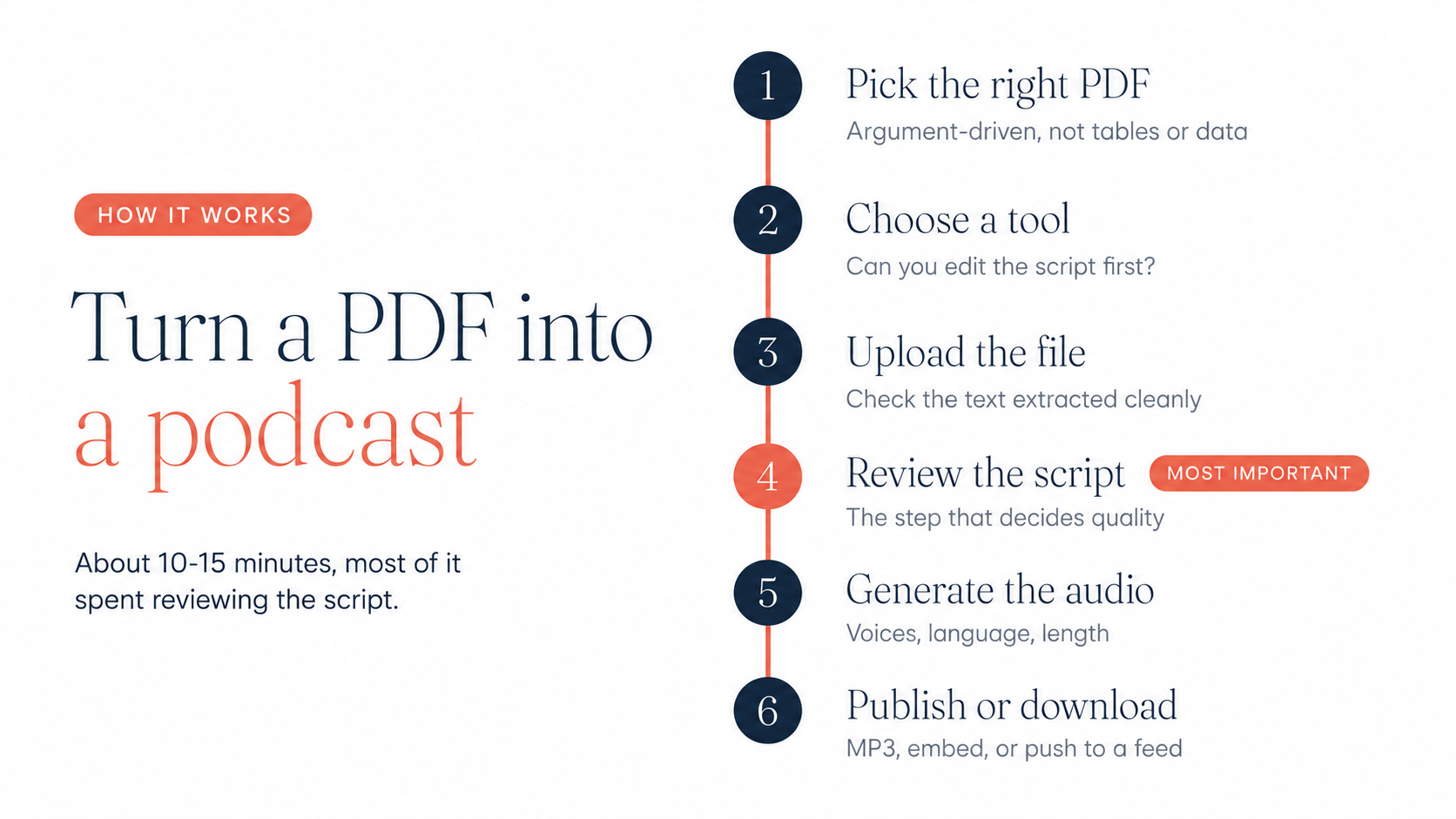
Generate the audio. From there: download the file, share a listening link, embed the player on your site, or distribute it as a podcast feed. Total time from upload to shareable episode: 10–15 minutes, most of it the script review — the step actually worth spending time on.
What kinds of PDFs work best?#
Anything written to inform converts well. The strongest use cases we see:
- Reports and whitepapers — a 20-page document becomes a 12-minute episode that gets finished on a commute instead of skimmed at a desk.
- Onboarding and training manuals — new hires listen before day one; frontline teams without desks finally get the same material as everyone else.
- Research papers — listen to triage your reading list, then deep-read only what deserves it.
- Ebooks and guides — chapter-by-chapter conversion turns a lead magnet into a series.
For the full picture of converting other formats — Word docs, slide decks, plain notes — see our complete guide: turning any document into a podcast.
Frequently asked questions
Can I turn a PDF into a podcast for free?
Yes. Google's NotebookLM does it free, and Sprep has a free tier. The free-tool trade-off is control: one-shot generation with no script editing, limited voice and language options. Fine for personal listening; risky for anything published.
How long can the PDF be?
Long documents are fine — the practical question is audio length, not page count. A very long PDF may be better as a series of shorter episodes than one long one; you control this at the script stage.
Does it work with scanned PDFs?
Only if the text is machine-readable. If you can't select text in the PDF, run OCR first (many scanners and PDF apps have this built in), then upload.
What happens to tables, charts, and formulas?
They're interpreted, not read aloud — the AI describes what the data shows. Always check these sections in the script review; summarizing data is where AI most often gets emphasis subtly wrong.
Will the podcast follow my PDF's chapter structure?
The AI restructures for listening, which usually means following your document's logic but not its literal headings. If structure matters, adjust it in the script — it's plain text.
Is the AI version accurate?
Mostly — and "mostly" is the problem. Users of one-shot tools report roughly 95% accuracy with the remaining 5% wrong in ways that are hard to catch without reading the source. The reliable fix is reviewing the script before audio is generated, which is exactly why Sprep's workflow includes that step.
Try it with your own PDF. Upload it, read the script the AI writes, and see what you'd have caught. Start free
See it in action